AI Content Automation
Read a topic from a sheet, research it with Tavily, and have an AI agent write a post for LinkedIn, X, a blog or a newsletter back into the same row.
The problem
Drafting a post from a topic list still means opening a sheet, searching the web, and pasting a draft back by hand.
The solution
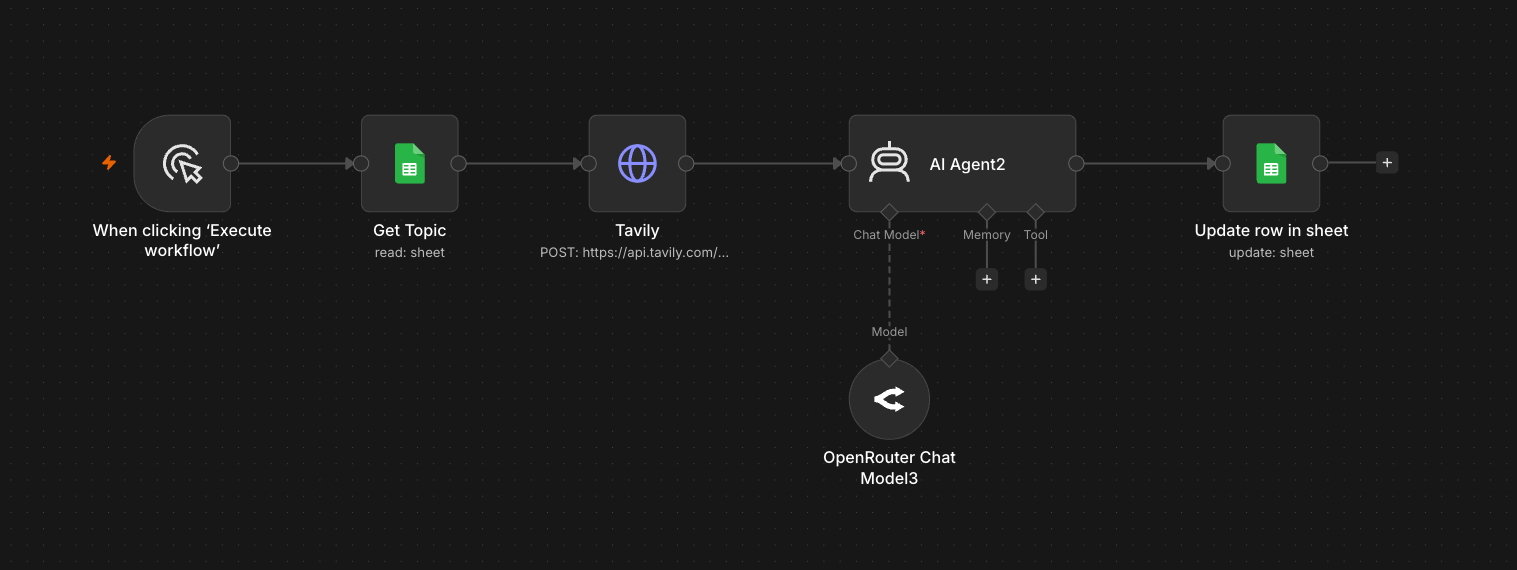
The workflow starts from a manual execute trigger, reads the next topic from a sheet, searches with Tavily, and asks an OpenRouter-backed agent to write the draft into that row.
How it works
- 1
Start the run
A manual trigger starts the workflow when a new topic is ready in the sheet.
- 2
Get the topic
Get Topic reads the next topic row from Google Sheets.
- 3
Research with Tavily
A Tavily request gathers current source material on that topic, so the post builds on real information.
- 4
Write the post
An AI agent on an OpenRouter chat model turns the research into a finished post.
- 5
Save it to the sheet
Update row in sheet writes the post into the same row, where it waits for a final read before it goes out.