AI Customer Support Agent
Pick out the support requests in your inbox and answer them from your own knowledge base, with an AI agent that replies in Gmail.
The problem
Support inboxes fill up with the same questions. Every answer means looking something up and typing a reply by hand, while other mail gets in the way.
The solution
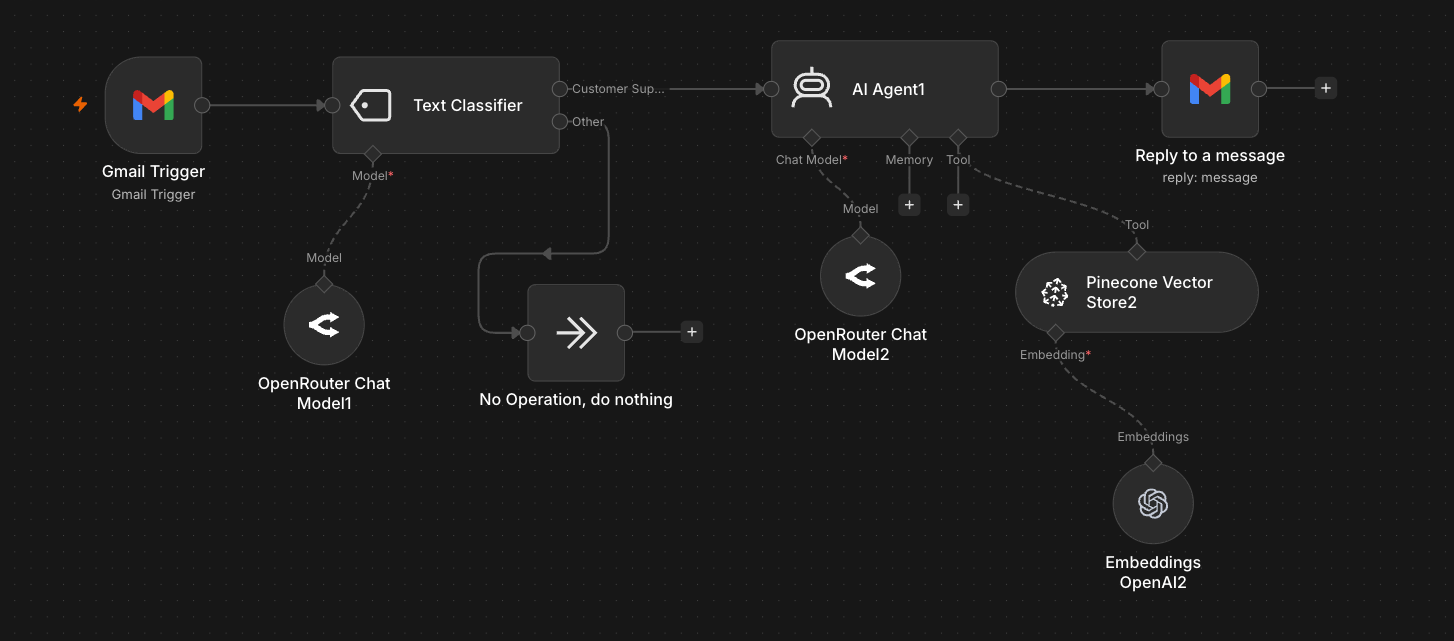
The workflow watches a Gmail inbox, uses a text classifier to separate support requests from everything else, and hands each request to an AI agent that searches a Pinecone knowledge base before replying to the sender.
How it works
- 1
Catch new email
A Gmail trigger starts the workflow for every new message in the inbox.
- 2
Sort support from the rest
A Text Classifier backed by an OpenRouter chat model labels each email as customer support or other. Anything else ends at a No Operation node, untouched.
- 3
Look up the answer
An AI agent searches a Pinecone vector store, embedded with OpenAI, for passages that answer the question, so the reply rests on your own documentation.
- 4
Reply in the thread
A Gmail node replies to the original message, in the same thread as the customer's question.