Lead Intake & CRM
Take a form submission, skip duplicates, optionally score the lead with OpenAI, then upsert the contact in HubSpot and notify Slack and email.
The problem
A new form lead still has to be checked against existing records, written into the CRM, and announced to the team before anyone follows up.
The solution
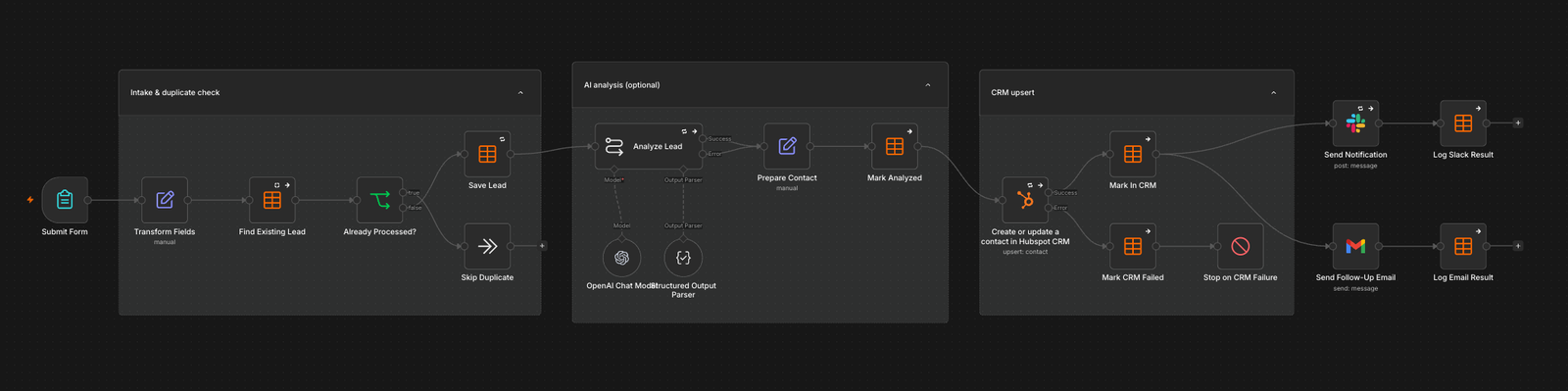
The workflow starts at a form trigger, transforms the fields, and looks up an existing lead. If it was already processed, the run saves and continues; otherwise it skips the duplicate. An optional OpenAI step analyzes the lead, then HubSpot upserts the contact. Slack and Gmail only run after a successful CRM write.
How it works
- 1
Intake and duplicate check
Submit Form starts the run. Transform Fields normalizes the payload, Find Existing Lead looks it up, and Already Processed? either saves the lead or skips the duplicate.
- 2
Optional AI analysis
Analyze Lead uses an OpenAI chat model with a structured output parser. On success, Prepare Contact shapes the record and Mark Analyzed logs it. The step is labeled optional.
- 3
Upsert in HubSpot
Create or update a contact in HubSpot CRM. Success marks the lead in the CRM. A failure marks CRM failed and stops before any notification is sent.
- 4
Notify and follow up
After a successful upsert, Send Notification posts to Slack and Send Follow-Up Email sends through Gmail. Each branch logs its result.